Restriction Digest and Cloning
In Restriction Digest you pick enzymes for a sequence, see the fragments they produce, and see the gel you would run, so you can find a clean single cutter, or spot fragments that would run as one band, before you cut anything at the bench. Construct Assembly goes the other way and joins parts from your library into a new sequence.
Both live under Cloning at the top of a sequence's sidebar, and both work on DNA.
Running a Digest
Restriction Digest opens on Select Enzymes. The list starts with the common enzymes, and every row carries its recognition sequence and how it behaves on this sequence: 1 cut, 6 cuts, or no sites. Single cutters sort to the top. The list opens with no enzyme ticked.
Search covers the full enzyme catalog, by name or by recognition sequence.
Single cutters only narrows the list to enzymes that cut exactly once here. When no enzyme cuts once, the list shows No enzyme here cuts this sequence once, and clearing the filter brings the rest back.
Tick your enzymes and the Fragments list fills in underneath, each fragment with its length and both of its ends, either blunt or the overhang and the enzyme that left it. Once at least one enzyme is ticked, View Gel takes you to the picture.
Reading the Gel
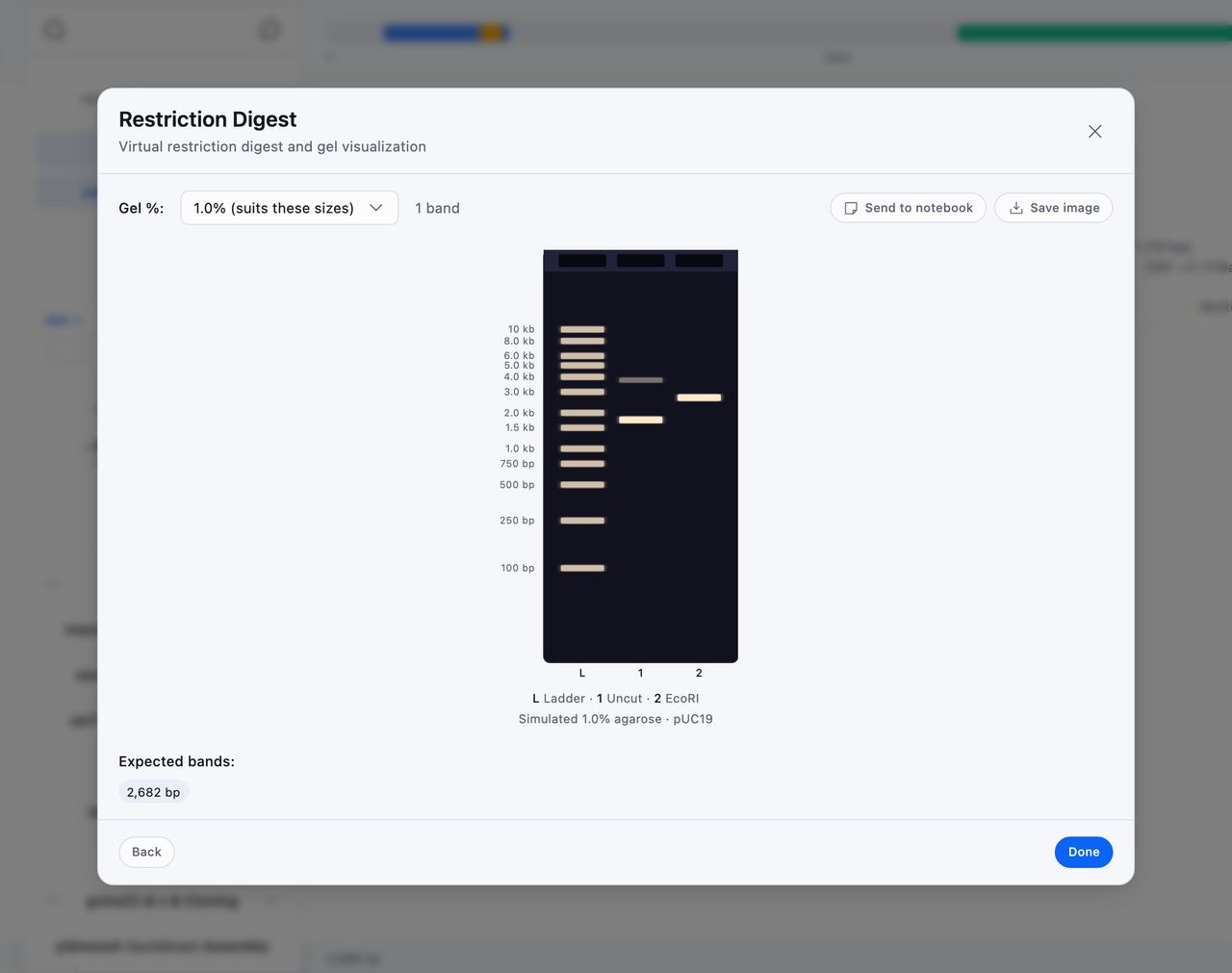
The gel shows a ladder in the first lane, then your uncut sequence, then the digest.
Tip: The uncut lane shows how a plasmid runs when you load it uncut. A circular plasmid runs as a bright supercoiled band ahead of its length and a faint nicked band behind it, both labeled with the plasmid's length in base pairs, so an uncut plasmid sits away from its size on the ladder.
Gel %: offers 0.8, 1.0, 1.5, 2.0, 2.5, and 3.0, and the one that suits your fragment sizes is marked (suits these sizes).
Hover a band to read it. A fragment shows its size, the supercoiled and nicked bands are labeled with the direction they run, and a band holding more than one fragment shows how many.
Two fragments within five percent of each other in size run as one band. A note under the gel names the size they share, and Expected bands: marks that band with the count, such as 1,234 bp ×2.
Save image downloads the gel as a PNG to put beside your gel photo. Send to notebook adds it to the end of a page you pick, as a caption naming the enzymes and the percentage followed by the picture, and the confirmation carries an Open link to that page.
Building a Construct
Construct Assembly joins sequences end to end into a new one. Name it first, in Assembly name, which becomes the saved sequence's name.
Add parts opens the Part Library, which searches your project by name, description, or registry identifier, and filters by registry type. Tick everything you want and Add to assembly drops it on the canvas.
Each part on the canvas has Move up, Move down, and Remove fragment, and a toggle reading Fwd or RC that flips it to its reverse complement. A reversed part draws in a different color with an RC tag, so you can see the orientation of every piece. Reorder them into the order you want, because the order on the canvas is the order they are joined in.
The running total underneath shows how long the construct will be and how many fragments it holds, and a warning appears when the parts mix sequence types.
Save Assembly writes the result as a new DNA sequence, recording every part you used as its parent. Connections on the construct lists those parts, and each part lists the construct among the things built from it.