Plans and Billing
This page covers what each plan includes and how subscriptions are scoped. For current prices, see the pricing page.
How Subscriptions Are Scoped
A Conspecta subscription belongs to a team. That means:
- One subscription covers the whole team, including every project inside it
- Everyone on the team draws from the same monthly usage allowance
- The team owner (or an admin) is the only person who can change the plan
- If you're a member of two different teams, each team has its own independent subscription
You can't buy a subscription for a single project. If you need separate billing for different lines of work, create a separate team for each. Every team you own has its own plan and its own monthly usage allowance.
Teams and Projects You Can Create
You can create more than one team, though the number you can own depends on the plans of the teams you already own. Until one of them is on a paid plan, you can own one team, and owning a paid team raises that limit. Each team you own has its own plan, seats, and compute usage. Its projects stay separate from your other teams. Create a separate team whenever a line of work needs its own plan, its own collaborators, or its own data boundary.
Joining a team that someone else owns never counts toward that limit, and never raises it, whatever plan that team is on. You can be a member of as many teams as you're invited to. When you reach the limit on teams you can create, Conspecta prompts you to upgrade.
A free team holds two people, you and one collaborator. That's enough for a student and their advisor, or two colleagues sharing one line of work. To bring in a third person, the team needs a paid plan. Academic opens the roster to 10 or 20 people, and Business is sized for your organization when we quote it. When a free team is full, further invitations are refused with a prompt to upgrade.
Inside a team, create as many projects as your work needs. Projects don't carry a plan or seats of their own. Every project draws from the team it belongs to, so adding one never changes what you pay.
Plans
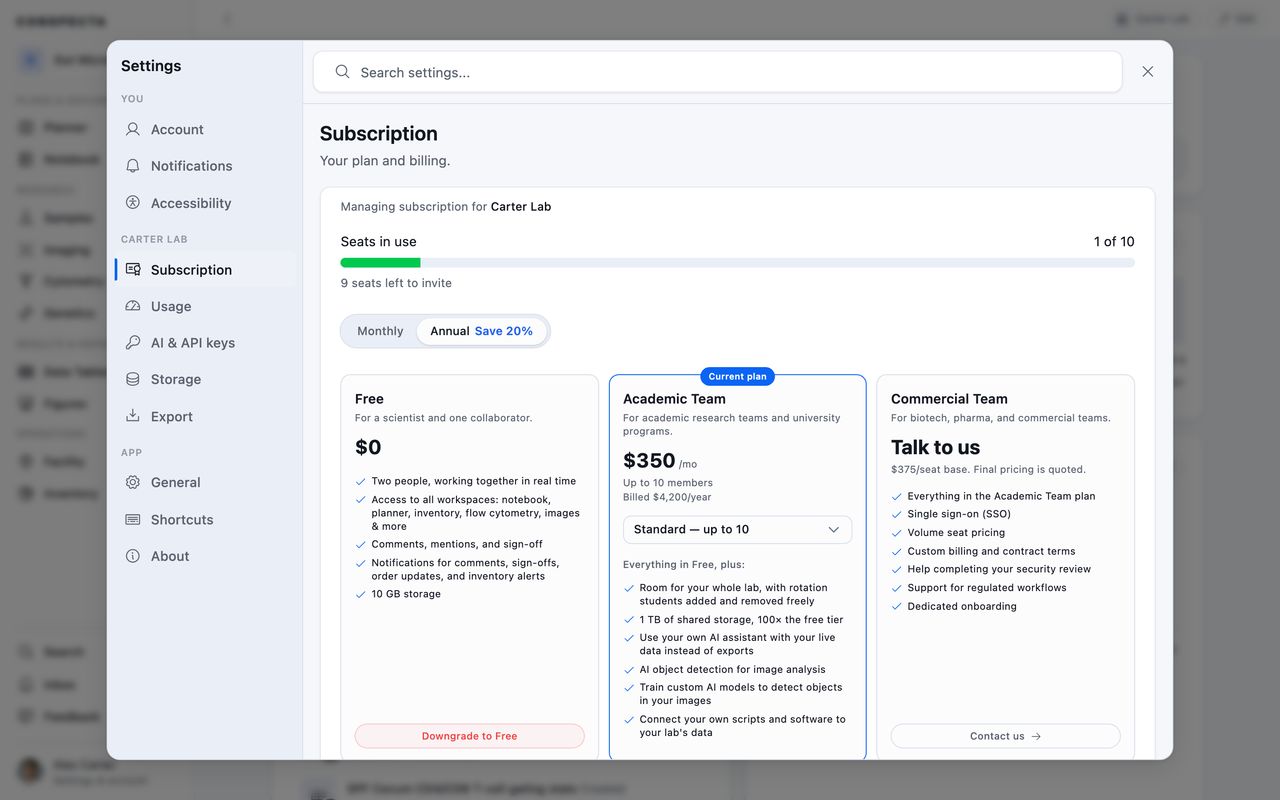
Conspecta has three plans. Free and Academic are self-serve, so you can start either one yourself from the pricing page or from Settings. Business is quoted for your organization, so it starts with a conversation. See the pricing page for current prices. Inside the app, the Business plan appears in Settings as the Commercial Team card.
| Plan | Seats | Storage | Cloud compute and API | Security and compliance | How it is billed |
|---|---|---|---|---|---|
| Free | 2 | 10 GB shared | Needs a paid plan | Encryption, project isolation, US hosting | Nothing to pay |
| Academic Standard | 10 | 1 TB shared | Included | Encryption, project isolation, US hosting | One flat rate for the lab, monthly or annually |
| Academic Large | 20 | 1 TB shared | Included | Encryption, project isolation, US hosting | One flat rate for the lab, monthly or annually |
| Business | Sized in your quote | Sized in your quote | Included, usage sized in your quote | Adds help with your security review, plus SSO and regulated-workflow support, each quoted | Quoted, monthly or annually |
Cloud compute is the server-side work described under Monthly usage. The API is how your own scripts and AI assistants reach your data, and Connect your AI assistant walks through the setup. Both open up on any paid plan.
On every plan, your data is encrypted in transit and at rest, each project is isolated at the database level, access follows the role you give each member, backups run automatically with point-in-time recovery, everything is stored and processed in the United States, and you can export whenever you want. The security page has the detail.
Compliance
Vendor reviews ask the same handful of questions. Where Conspecta stands today:
| Requirement | Where we stand |
|---|---|
| GDPR | Followed on every plan. You can access, export, correct, and delete your data. |
| SOC 2 and ISO 27001 | Our controls follow the SOC 2 Trust Services Criteria and run today. There is no audit report yet. When a contract needs one, we engage an auditor for a Type I, which reports on a single point in time. ISO 27001 covers the same controls, and we can pursue it instead if your review requires it. |
| HIPAA and PHI | Most discovery and preclinical work does not involve PHI, and our standard terms exclude it. Identifiable patient data needs a BAA, which is quoted with a Business plan. Talk to us before you upload anything covered. |
| 21 CFR Part 11 and GxP | Notes, protocols, and sequences in Genetics carry version history. Changes are logged with who made them and when, and the log can't be edited. Sign-offs record who approved what and show when the record has changed since, and protocol runs keep a step-by-step trail. A Business engagement validates Conspecta against your workflow and adds the signature controls Part 11 requires. |
| Data residency | Data is stored and processed in the United States, with Standard Contractual Clauses for EU transfers. Another region is a Business conversation. |
| Security questionnaires | On any plan, ask and we send our written answers, the subprocessor list, breach-notification terms, and the SOC 3 report from Amazon Web Services, which runs our infrastructure. If your review needs its own form filled in, a call with us, or evidence pulled from our live systems, that's part of a Business plan. |
Free
For a scientist and one collaborator. Every workspace included, comments, mentions and sign-off, and 10 GB of shared storage. Cloud compute and API access both need a paid plan. To try an AI assistant on your data before you upgrade, ask us and we can switch it on for your account.
Academic Team
For a single academic lab or research group, sold with an academic discount. The Standard tier includes 10 seats and Large includes 20 seats, each with 1 TB of shared storage and a monthly usage allowance sized for academic work. Rotation students can be added and removed freely up to the cap.
Both academic tiers also include cloud compute for image analysis, and let you connect your own scripts and AI assistants to your lab's data.
Business
For biotech and pharma discovery teams, and shared facilities serving many labs. Business is quoted for your organization, so seats, storage, and monthly usage are all settled in the quote. The pricing page shows a standard per-seat rate to plan around, and your price is set in the quote.
Single sign-on, custom billing and contract terms, support for regulated workflows, integration with your instruments and systems, data migration, dedicated onboarding, and custom work are quoted on top of the plan. Help moving in and getting set up says what each of those covers.
Sign in with SSO on the sign-in screen takes your work email and, when your organization isn't connected yet, points you at the contact form to get it set up.
To get started, contact sales and we'll set your team up. After that it's self-serve. The team owner manages the plan from the Subscription section, adding or removing seats, updating the payment method, and downloading invoices.
Help moving in and getting set up
We help you move a lab off spreadsheets and a shared drive. Each of these is quoted alongside a Business plan and agreed before you sign.
| What we do | What it covers |
|---|---|
| Integration with your instruments and systems | We connect the instruments and the systems you already run, so files land here as a run finishes and your orders, bookings, and records stay in step with them. |
| Data migration from your current system | We take what you have now, such as spreadsheets, an export from another ELN, or folders of files and images, and load it into Conspecta as samples, notes, and files. |
| Dedicated onboarding | Setup and training with your team, so people arrive at a workspace that already holds their work. |
| Single sign-on (SSO) | Your identity provider connected, so people sign in with their work account. |
| Custom billing and contract terms | Purchase orders, invoicing, and an agreement your legal team has been through. |
| Support for regulated workflows | Validation and support for work that runs under 21 CFR Part 11 or GxP. |
| Custom work scoped with you | Something specific to how your organization runs. Raise it when we talk and we'll work out what it takes. |
Each one is priced separately from the plan. Start at contact sales and tell us what your rollout needs.
Annual vs Monthly Billing
Academic and Business can both be billed monthly or annually, and annual billing comes with a discount over the monthly rate. Switch the interval on the pricing page and the cards follow it. Academic shows the annual total and the saving, and Business shows the standard per-seat rate for the interval you picked.
To change a subscription you already have, from monthly to annual, from Academic Standard to Large, or from Academic to Business, contact us and we'll make the change on your subscription. The new plan's seats and monthly usage apply as soon as it goes through.
Monthly Usage
Your subscription includes a monthly usage allowance for the work that runs on Conspecta's servers: image-analysis detection, and the flow cytometry clustering and dimensionality reduction you choose to run on a server instead of in your browser. See Compute usage for how usage is tracked and what consumes it.
A few facts that apply across all plans:
- Your monthly usage allowance resets on the 1st of each month (UTC)
- Unused monthly usage does not roll over to the next month
- Data exports are always free and never count toward your usage
- Buying additional usage between billing periods is coming soon
Seats
Each plan includes a set number of seats, listed under Plans above. The free plan seats two people, and the paid plans open the roster to a whole lab.
The team owner can see how many seats are in use and how many remain in the team's Subscription section, so you can check for room before inviting.
An invitation holds a seat from the moment you send it, not from the moment it's accepted, so a team with one member and one unanswered invitation is already using two seats. The Subscription section says how many seats are being held that way. If a team is full and you'd rather invite someone else, remove the waiting invitation from the team's member list and the seat is free again.
When a team fills its seats, new invitations are blocked with a message asking the owner to upgrade or add seats. On Business, the owner changes the seat count from the Subscription section through Manage payment method & invoices, up to 20 seats, and the plan adjusts automatically. For a larger roster, talk to us and we'll set it.
What Happens If Your Subscription Lapses?
A subscription lapses when the team owner cancels it, or when payment fails repeatedly and the grace period passes. The team then moves to the Free plan.
A team of two people or fewer carries on as a free team. Everything in it stays editable, and Free's limits apply from then on: 10 GB of shared storage, and no cloud compute or API access.
A team with more people than that becomes read-only:
- You can still view every project, sample, note, figure, and analysis in the team
- You can still export your data, including bulk exports from the project menu and per-workspace exports
- Everyone already on the team stays on it and keeps that view and export access. Nobody new can join
- You cannot start a new project in the team, or create or edit content in its projects or its shared templates. Saving a note, uploading a sample, adding a task or a comment, or running a new analysis is blocked
- New compute jobs are blocked. In-flight jobs are allowed to finish
A read-only team gets editing back in one of two ways. The owner reactivates a plan from the team's Subscription section, or the owner removes members until the team has two people and it carries on as a free team. Either way nothing has to be re-imported.
Team owners and admins get an email when the subscription ends or a payment fails, including when the team moves to Free. Everyone working inside a read-only team's projects sees a banner that links to reactivation and to data export. If you'd also like these alerts in your in-app Inbox, turn on Plan status in Settings → Notifications.
Data retention: We keep a read-only team's data for 90 days after the subscription ends. After that, the team and everything inside it may be permanently removed. Export anything you want to keep before the 90-day window closes, or reactivate to keep your data active indefinitely.
To take your data elsewhere, export it during the read-only window. Project exports include raw files plus structured workspace data (notes, tables, sequences, analysis).