Flow Advanced Analysis
Use these tools to map a large panel onto two axes, find populations without drawing every gate, and measure cell cycle, proliferation, acquisition stability, and marker shifts between populations. They all run in your browser and use no compute usage. Clustering and dimensionality reduction can also run on a server, and that's the only part of this page that uses any.
Dimensionality Reduction
Dimensionality reduction maps a panel with many markers onto two axes you can plot. Click Dim. Reduction in the Analysis section of the sidebar and choose a method:
| Method | What it is |
|---|---|
| UMAP | Uniform Manifold Approximation and Projection. It keeps local clusters together and keeps their positions relative to each other. |
| t-SNE | Classic t-SNE, with perplexity and learning rate settings |
| PCA | Principal components. Linear, fast, and interpretable |
To run it:
- Tick at least two parameters.
- Change the settings if you want to. The defaults are set from the number of events you have, so run with them first and tune afterward.
- Click Run UMAP, Run t-SNE, or Run PCA.
On a large file, Subsample starts below the file's event count, and the dialog box shows how many events the run will use.
When the run finishes, Conspecta adds a scatter plot on the new axes. The axes are UMAP-1 and UMAP-2, t-SNE-1 and t-SNE-2, or PC1 and PC2. They also appear under Computed in every axis menu, so you can put them on other plots or gate on them.
You can keep one result from each method at a time and compare the embeddings side by side. Running a method again replaces its earlier result.
A result only draws on the events it was computed from. If you switch to a file the run didn't include, or change the compensation, plots on these axes read Missing data for plot. Run it again to bring them back.
Clustering
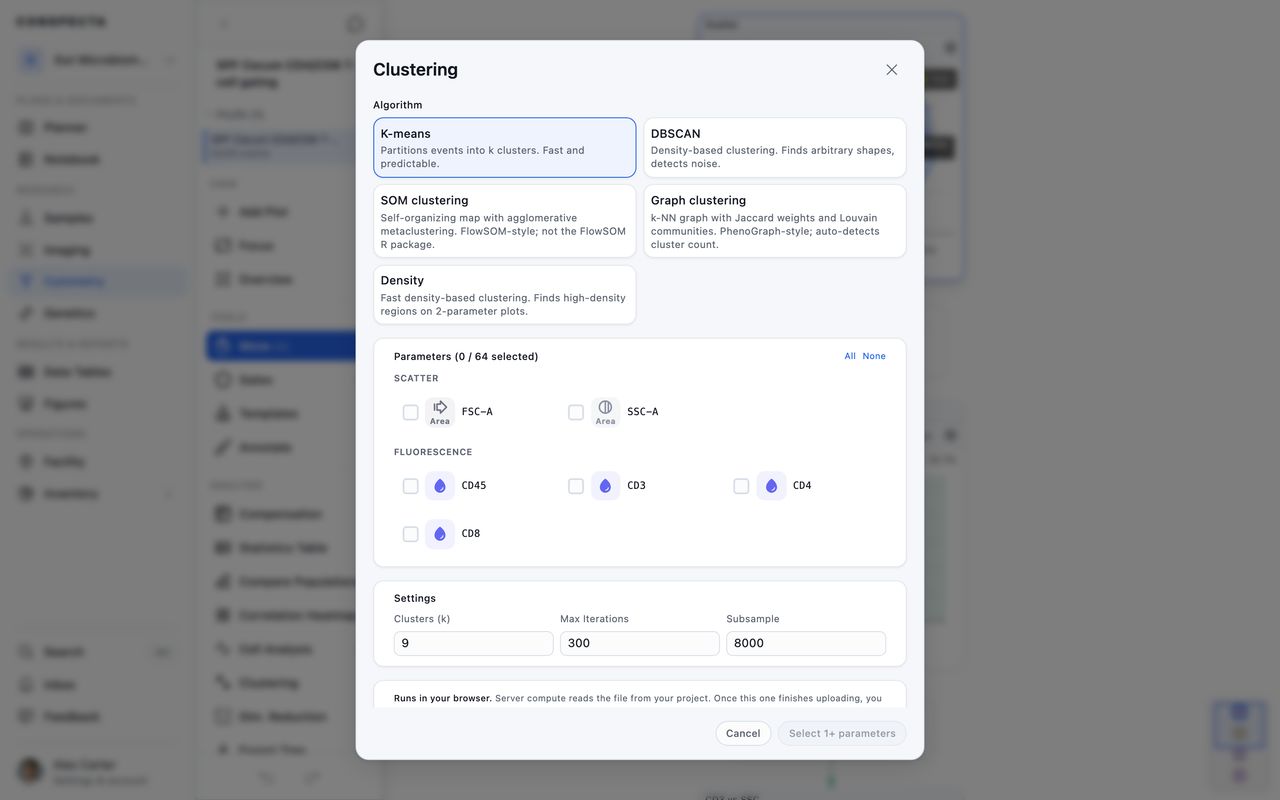
Clustering finds populations for you, in place of gates you draw. Click Clustering in the Analysis section of the sidebar.
Choosing an Algorithm
| Algorithm | What it does | Parameters it takes |
|---|---|---|
| K-means | Splits events into the number of clusters you set. Fast and repeatable | Up to 64 |
| DBSCAN | Follows dense regions of any shape and leaves stray events as noise | Up to 8 |
| SOM clustering | Sorts events onto a map, then merges the map into populations, in the style of FlowSOM | Up to 64 |
| Graph clustering | Groups events with their nearest neighbors and finds the cluster count itself, in the style of PhenoGraph | Up to 64 |
| Density | Finds the busiest regions on a two-parameter plot and suggests gates around them | The two axes you pick |
SOM clustering and Graph clustering are Conspecta's own implementations in the style of FlowSOM and PhenoGraph, and the dialog box says so. Describe them that way in a methods section.
DBSCAN takes at most eight parameters, because past eight dimensions the distances between events stop separating populations in a way you can trust. If you've ticked more than eight and switch to DBSCAN, the dialog box keeps your selection and tells you how many to remove before you can run it.
All ticks your fluorescence channels, up to the algorithm's limit, and leaves out scatter and time.
Run It and Read the Result
- Choose an algorithm.
- If you have more than one file loaded, choose what to run on under Run on. Running Across Several Files explains the choice.
- Tick the parameters and change the settings if you want to.
- Click Run K-means, or the run button for the algorithm you chose.
When the run finishes, the dialog box shows each cluster with its event count and its share of the total. Type in the Name column to rename a cluster. The line under the title names the run, such as "K-means · 8 clusters · 12 channels".
To turn clusters into gates, tick them, choose the axes under Project onto, and click Create N Gates. Each cluster becomes a polygon gate, and the gates appear in every statistic.
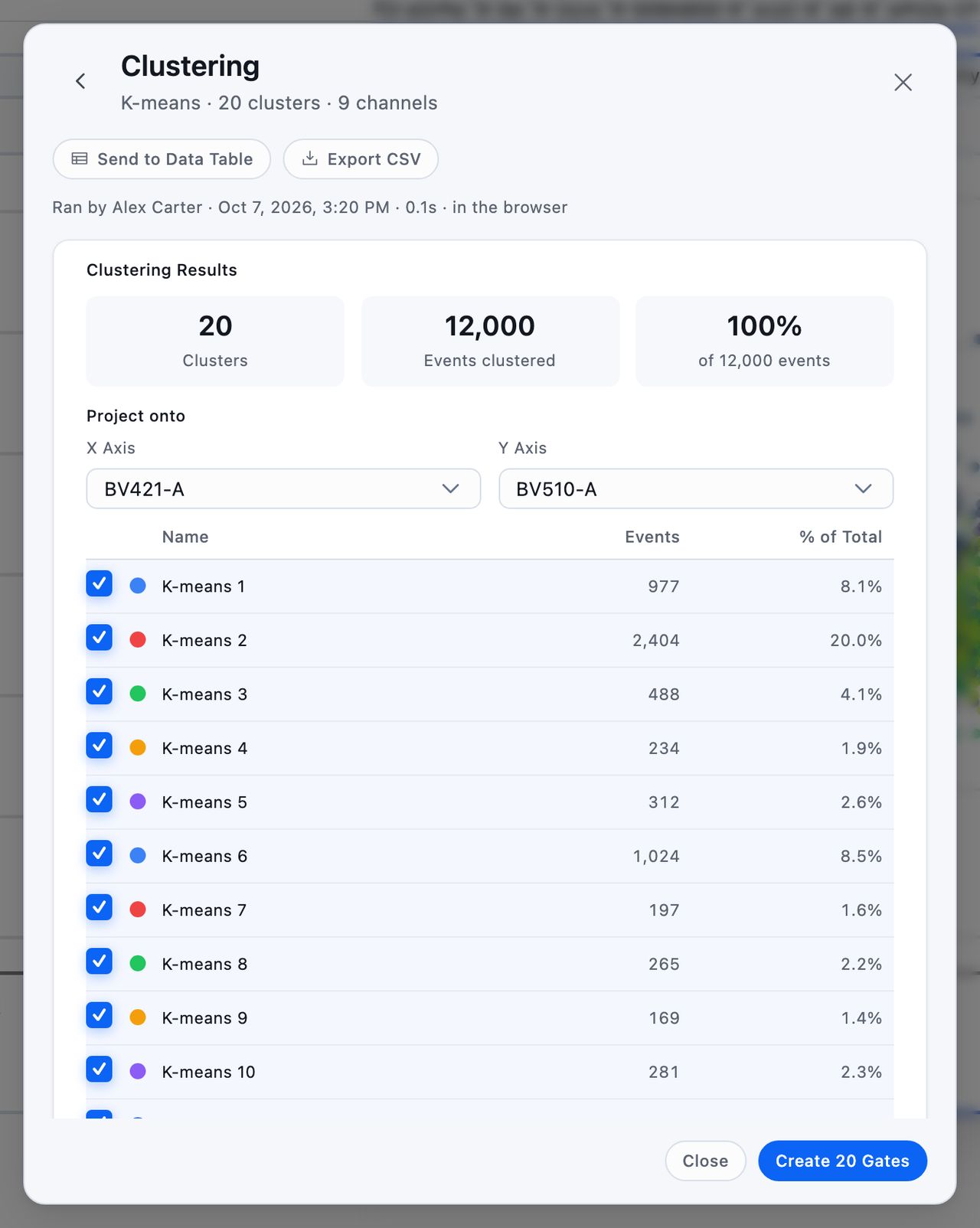
The buttons under the title export the result, and the cluster names you've typed carry through to each of them.
- Add to figure charts each file's share of each cluster on a figure. It appears only for a working-set run, because one file's cluster sizes have nothing to compare against.
- Send to Data Table creates a data table in the project with the same numbers.
- Export CSV downloads the clusters and their sizes. For a run across several files, it downloads each file's share of each cluster.
The Cluster Plot
Each run adds a scatter plot colored by cluster. Its title names the algorithm and the channels, such as "K-means clusters · CD3, CD4". Click the plot's title bar, where it reads View run, to open the run that made it.
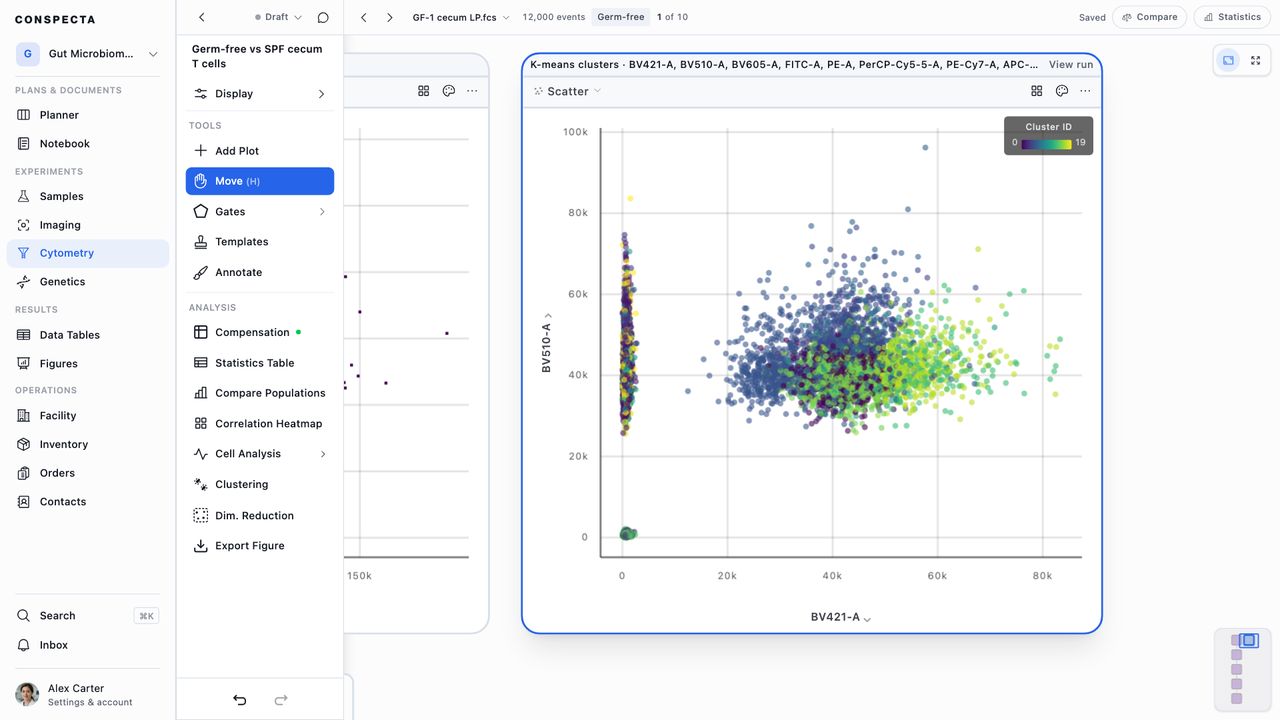
Every cluster plot shows the run it's titled after. Running again adds a new plot and leaves the earlier ones as they were.
The colors only show on the files the run covered. Switch to another file and the plot turns plain, with Ran on another file on its title bar. Run it again on the file you're looking at to color it.
Cluster plots stay colored after a reload, and members with view-only access see the colors too. A plot reads Not colored when:
- Compensation was applied or removed after the run, so the assignments describe values the events no longer have
- The run was saved before Conspecta kept assignments
Reopen a Run
Click a plot's title bar, or open Clustering again, to see the run's record. It shows who ran it and when, how long it took, whether it ran in your browser or on the server, the settings, and the clusters with the names you gave them.
Every run the analysis keeps is listed under Runs on this analysis. Click one to open it, or click New run to start a fresh setup form.
To recompute the run you're looking at with its own settings, click Re-run K-means (the button names the run's algorithm). The colors come back on the same plot.
When you open the setup form from a plot, Result goes to sets where the next run lands. Update this plot is the default. Choose Add new plot to keep that plot as it is. A run you start from the sidebar always gets a new plot.
Running Across Several Files
If you run a reduction or clustering on two files separately, you get unrelated axes, and each file numbers its clusters on its own. To compare samples, run them together.
When more than one file is loaded, both dialog boxes show Run on. Leave it on This file to run on the file you're looking at, or choose Working set to include every loaded file. Conspecta takes the same number of events from each file and runs the algorithm once over all of them, so every file lands on the same axes and inside the same cluster boundaries. The combined events exist only for the run, and no combined file appears in the sidebar.
Events per file sets how many events come from each file. An equal draw keeps a tube that ran four times as long as the others from dominating the map.
A working-set run has a few rules:
- You can pick only parameters that every file in the set has, so the list gets shorter when you switch to Working set. A warning names the missing parameters and the files that lack them.
- With compensation on, each file's events are corrected before they're combined, so the run sees the same values your plots show. If the matrix names a channel that one of the files doesn't have, the run stops and names that file.
- You can run it in your browser with Local, which uses no compute usage, or on Conspecta's servers with Server, the same choice a single-file run has. The server uses the same events a local run would. Server appears once every file in the set has finished uploading. Flow Cytometry Compute covers what a server run uses.
For clustering, the results add a table of what share of each file's events fell in each cluster. Every file went through one run, so a cluster is the same population in every row.
Create N Gates still draws gates on the file you're looking at. Each gate outlines that file's own events in the cluster, so it matches the plot in front of you. A cluster with none of this file's events gets no gate.
Density clustering has no Run on choice, because it reads one file's own density.
Specialized Tools
Open Cell Analysis in the Analysis section of the sidebar to find these tools.
- Cell Cycle fits Gaussian peaks to a DNA histogram and splits it into G0/G1, S, and G2/M. It reports the percentage in each phase and the peak positions. It picks the DNA channel by name when it can (DAPI, PI, Hoechst, DRAQ, 7-AAD, SYTO 9, SYTOX Green).
- Proliferation works on a dye-dilution channel (CFSE, CellTrace, CPD) and splits it into generations. It reports the number of generations, the division index, the percentage of cells that divided, and the event count in each generation. The division index and the percentage divided weight each generation by the starting cells it came from.
- Kinetics looks for unstable stretches across acquisition time. Click Apply Gates to gate them out.
- Quality Control also finds bad time windows, with the focus on excluding them. Flow files and templates covers it.
Cell Cycle and Proliferation report numbers only. Kinetics and Quality Control can add a time gate.
Applying a kinetics or quality-control time gate moves your whole gate tree under it. Conspecta creates a time gate on a Time histogram at the top of the tree and moves every top-level gate and plot under it, so it filters every population below. One undo takes it back.
Saved Results
In Cell Cycle, Proliferation, or Kinetics, click Save Results to keep the numbers with the analysis. The next time you open that tool, they're on a Saved Result card that names the channel, the file, and how long ago the run was. Remove Result deletes it, after asking first.
In the Cell Analysis menu, a green dot next to Cell Cycle, Proliferation, or Kinetics means it has a saved result. Quality Control gets a dot once you've applied its time gate.
Changing the compensation clears saved results, and so does switching to another file, since the numbers describe one file's events under one compensation.
MFI Comparison
MFI Comparison compares two populations marker by marker. Open Cell Analysis in the sidebar and click MFI Comparison. It's available once you've drawn at least two gates.
- Choose a Control Population and a Sample Population.
- Tick the markers you want to compare.
For each marker, the table shows the median fluorescence intensity in each population, the fold change, the log₂ fold change, and a p-value from a Kolmogorov-Smirnov test. P-values below 0.05 are in bold. A bar on each row shows the direction and size of the shift.
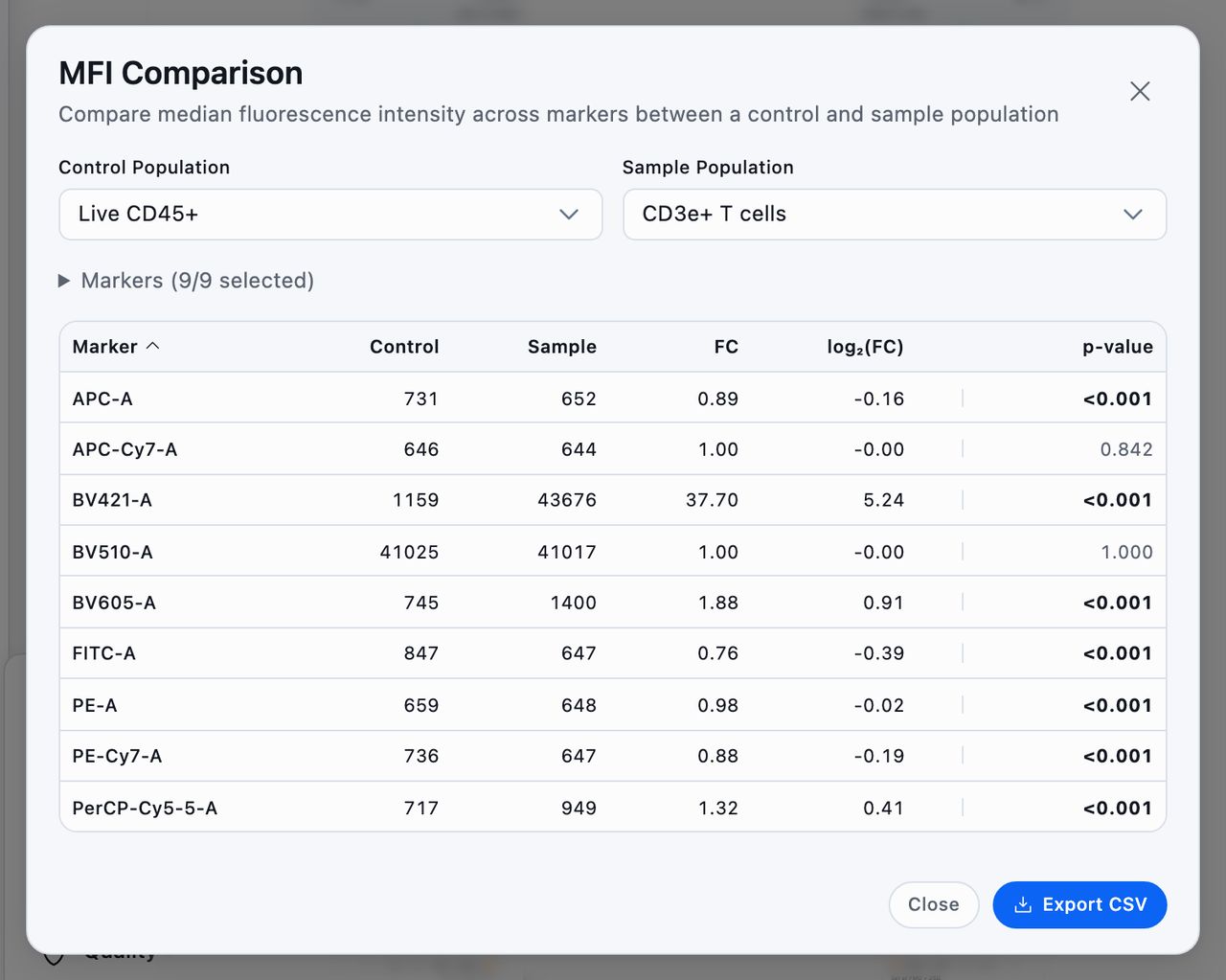
If the control's median is zero or below, the fold change reads n/a.
Export CSV downloads the whole table.
Run in Your Browser or on a Server
These tools run in your browser, on your computer. They skip the queue, use no compute usage, and keep your data in your session. On a very large file, your computer sets the limit. Subsample to fit, and each dialog box shows how many events it's using.
Clustering and Dim. Reduction also have a Compute Location setting with Local and Server. Choose Server to send the run to Conspecta's servers when your computer can't get through it, for one file or the whole working set. A server run uses compute usage:
- 1 for most algorithms
- 5 for DBSCAN and Graph clustering
The number is the same whatever the run covers, and the dialog box shows it before you run. Density clustering always runs locally. Flow cytometry compute has the full table and how it's worked out.
Members with view-only access see the cluster colors on saved plots and can open MFI Comparison. The other tools on this page need edit access.