Primer and CRISPR Design
Three tools design what you are about to order: PCR primers for a region you want to amplify, CRISPR guides against a target, and a codon rewrite for the organism you are expressing in. All three work on DNA and open from the selection menu, so you pick the bases first and each tool opens on them.
Drag out the region, then choose the tool from the menu. Plasmid Maps and the Sequence Viewer covers that menu and the rest of the viewer.
Designing Primers
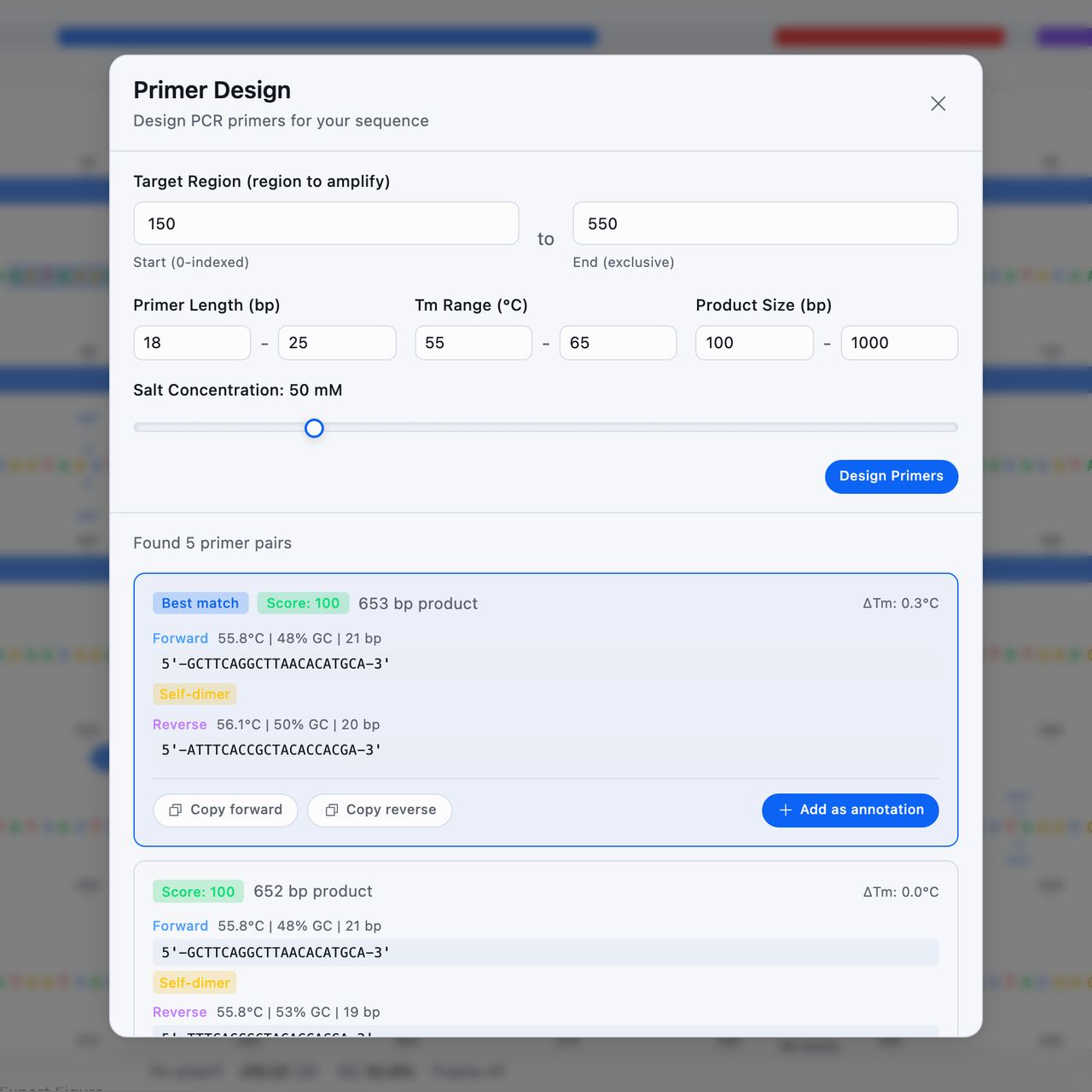
Design Primers sits under Create. It opens Primer Design with your selection already in Target Region (region to amplify), as From base and To base.
Both count from 1 and include the bases they name, the way the map numbers its features, and both stay editable. Open it without a selection and it aims at the middle of the sequence.
To amplify a feature, open its menu in the Features list and choose Design primers. Primer Design opens with the feature's first and last bases as From base and To base, and the feature is selected on the map.
Four parameters shape the search:
| Parameter | Starts at | You can set |
|---|---|---|
| Primer Length (bp) | 18 to 25 | 15 to 35 |
| Tm Range (°C) | 55 to 65 | 40 to 80 |
| Product Size (bp) | 100 to 1000 | 50 to 5000 |
| Salt Concentration | 50 mM | 10 to 200 mM |
Melting temperatures use nearest-neighbor thermodynamics with a salt correction, so they are comparable with the Tm on your ordering sheet.
Design Primers runs the search and returns up to five pairs, the closest match first and numbered from Pair 1. Every primer returned has its Tm inside Tm Range (°C), and no two pairs share a primer's 3' end, so each pair is a different binding site to try. A pair whose primers disagree by more than 5 °C is rejected.
Each pair shows the product size, the difference in melting temperature between its two primers, and a score out of 100. A score of 70 and above reads as Good, 50 and above as Fair, and anything lower as Poor. Only a pair with no warnings on either primer can score 100, and each warning lowers the most it can reach by 5. Each primer shows its Tm, GC content, length, and its sequence written 5' to 3'.
On a phone the parameters fold into a summary line once pairs come back. Edit opens them again.
Anything questionable about a primer is called out on the pair itself: a weak 3' clamp, a hairpin, a self-dimer, a repeat run, or GC outside your bounds. The pair still appears, so you can decide whether the flaw matters for this reaction.
Copy forward and Copy reverse take one primer to the clipboard. Add as annotation writes both onto the map as Primer Binding Site features named for their direction and melting temperature, such as Forward Primer (60.1°C), so the pair you ordered is on the map the next time you open the construct. Cmd/Ctrl + Z takes them back off.
When no pairs are found, the panel names the constraint that ruled them out.
Designing CRISPR Guides
CRISPR Design sits under Analyze and opens CRISPR Guide RNA Design.
CRISPR System picks the enzyme, and with it the PAM and the guide length:
| System | PAM | Guide |
|---|---|---|
| SpCas9 (NGG) | NGG, 3' | 20 bp |
| SaCas9 (NNGRRT) | NNGRRT, 3' | 21 bp |
| Cas12a/Cpf1 (TTTV) | TTTV, 5' | 23 bp |
| Cas12b (TTN) | TTN, 5' | 20 bp |
SpCas9 is selected for you. Target Region arrives from your selection and stays editable, and GC Content Range (%) starts at 30 to 70. Find Guide RNAs searches both strands inside that window and drops any protospacer carrying a run of more than four T's, since those terminate transcription of the guide.
The results are counted as high, medium, and low quality, and each guide shows its score, its strand, its sequence with the PAM, its position, and its GC content. Opening one breaks the score into what produced it: GC content, where the cut lands in your target, the seed region next to the PAM, the poly-T penalty, and self-complementarity.
The score ranks candidates against each other, and it is not an off-target search. Nothing here checks your guide against the rest of a genome, and the number is not a calibrated prediction of cutting efficiency. Use it to choose between the guides in this window, then check your shortlist against the genome you are editing before you order.
Finding nothing usually means the window is too tight, and the message names the constraint to loosen.
Add on a row, or Add as Annotation in the detail panel, writes the guide onto the map as a Feature named for its CRISPR system, such as gRNA (SpCas9). The feature keeps what the search worked out. Hovering it names the PAM, where the guide cuts, its score and its GC content, and carries any warning it came with. Opening the feature shows the same, above the label and position you can edit.
Codon Optimization
Codon Optimize, also under Analyze, rewrites your selection for expression in another organism. Codon Optimization offers six hosts: E. coli, Yeast, Human, Mouse, CHO Cells, and Insect (Sf9). E. coli is chosen for you.
Before you run anything, the dialog box shows the selection as it stands: its codon adaptation index for the host you picked, how many rare codons it contains, and how many codons there are in total.
Use only most frequent codon per amino acid takes the single best codon every time. Left off, the rewrite keeps some of the natural variety, which avoids the long identical runs that make a gene hard to synthesize.
Optimize Sequence shows the result before it touches anything: the adaptation index before and after, the improvement between them, how many codons changed, the new GC content, how many rare codons survived, and the first fifty changes written out as old codon against new. Stop codons and anything it cannot read are left alone.
Apply Optimized Sequence writes the new bases over the range you selected and leaves the rest of the sequence untouched. A trailing partial codon is put back as it was, so the length stays the same.
Tip: Applying a codon rewrite is one of the few edits
Cmd/Ctrl + Z will not take back. If you want the original bases
kept, run Save as New Sequence on the selection first and
optimize the copy.